Home Office Design: Build a Space That Boosts Productivity
A practical guide to home office design — choosing the right spot, desk ergonomics, lighting, acoustic tips, storage, style options, and how to visualise the space before you buy anything.
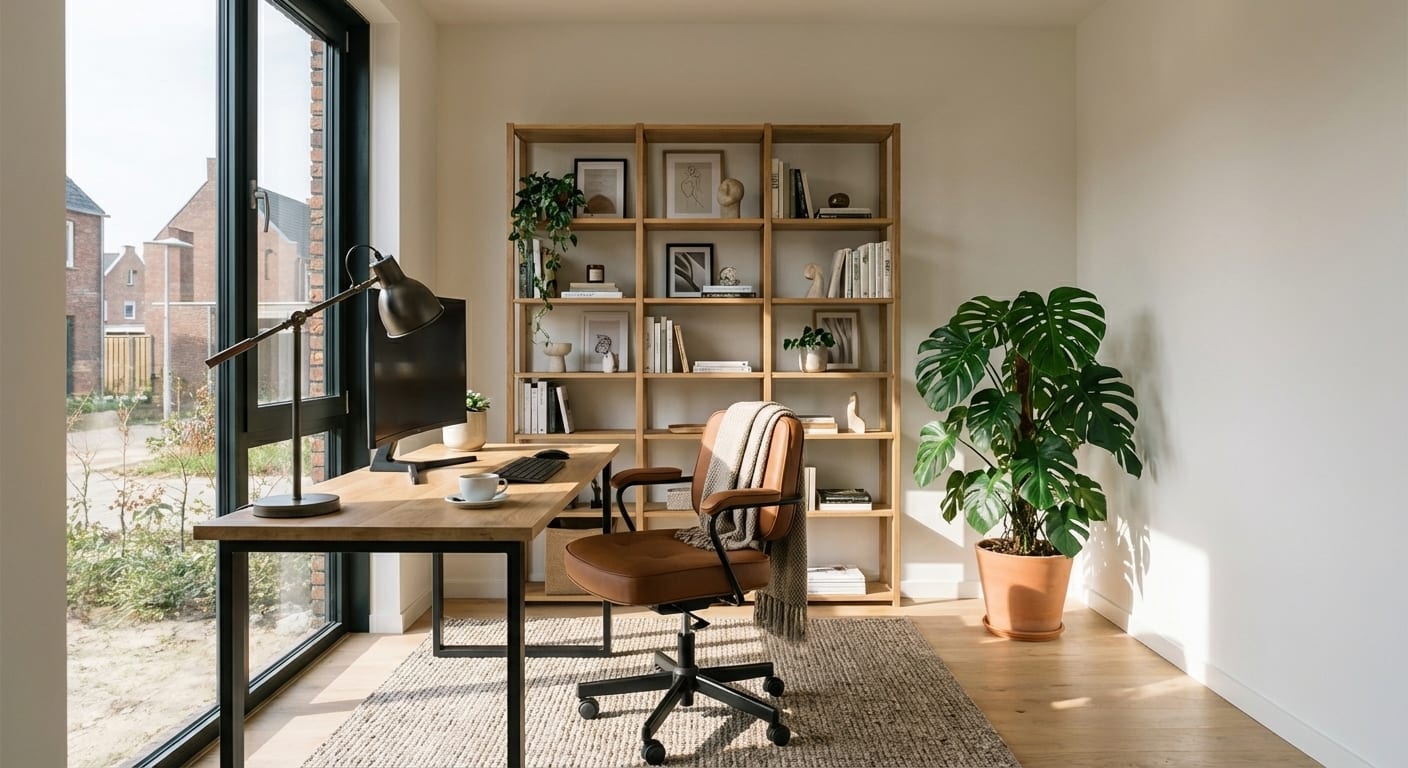
Working from home is no longer a temporary arrangement or a perk. For a growing number of people it is a permanent fixture of professional life. And yet the spaces most people work in — a corner of the bedroom, the dining table, or a hastily cleared-out cupboard — are not designed for work. They are just available.
A properly designed home office is not an indulgence. It changes how you think, how you present yourself on video calls, how clearly you can separate work from the rest of your life, and how much energy you have at the end of the day. This guide covers how to build one that actually works.
Step 1: Choose the Right Spot
Before you think about desks or lighting, you need to choose where to work. This decision shapes almost every subsequent choice.
What to Prioritise in Order
Natural light — but from the right direction. Natural light is the most important factor in a productive home office environment. It regulates your circadian rhythm, reduces eye strain, and makes the space feel more open and energising. But the position of the light source relative to your screen matters.
The ideal position: a window to your side (left or right of your monitor). This gives you ambient natural light without glare on your screen.
What to avoid: a window directly behind you (glare on your screen, creates a silhouette on video calls) and a window directly in front of you (harsh contrast between bright background and screen, causes eye fatigue).
Separation from the rest of the home. A closed door is not always possible, but some degree of physical separation between your workspace and your living space makes a genuine difference. The psychological impact of being able to "close the office" at the end of the day — even if it is just a curtain or a folding screen — helps you switch off more effectively.
If you live with other people, an enclosed space also means fewer interruptions and better audio quality on calls.
Size and ceiling height. The minimum functional home office is approximately 1.5 metres by 2 metres — enough for a desk, a chair, and a small amount of storage. If you have video calls regularly, you also need to think about what appears in the background behind you. A well-lit, tidy, attractive background is increasingly important as video communication has become the default professional medium.
Common Locations and Their Trade-Offs
Spare bedroom: The best option where available. A door that closes, complete separation from living areas, enough space for proper ergonomic furniture.
Bedroom corner: Workable but requires strong visual separation (a screen, a bookshelf divider, or deliberately different flooring or rug) to prevent the psychological blurring of work and rest spaces. Never work from the bed.
Living room corner: Common but challenging. Requires careful cable management, visible storage that looks good at all times (since it is also your living space), and acoustic consideration.
Converted cupboard (the "cloffice"): Surprisingly effective. A deep wardrobe or understairs cupboard, cleared out and fitted with a desk surface, shelf lighting, and a monitor arm, can be a genuinely productive workspace. The key advantages: completely enclosed when not in use, excellent at creating psychological separation. Disadvantages: typically no natural light, requires good task lighting.
Step 2: Desk Ergonomics
The desk is the centre of your workspace. Getting the size, height, and positioning right is not aesthetics — it is physical health over years of use.
Desk Height
Standard desk height is around 73–75cm, designed for someone of average height (around 170–175cm). If you are taller or shorter, this is worth adjusting.
The correct desk height for you: your elbows should rest at roughly 90 degrees when your hands are on the keyboard, with your shoulders relaxed — not raised. If you are using a standard-height desk and it is too high, the solution is usually a higher chair with proper foot support, not a lower desk.
Desk Surface Size
Minimum for a single monitor setup: 120cm wide by 60cm deep.
Comfortable for a single monitor with working space: 140cm wide by 70cm deep.
Dual monitor or creative work: 160–180cm wide. Consider an L-shaped desk if space allows — the corner section is excellent for paperwork or secondary equipment.
What not to put on the desk: everything you do not actively use during a working session. The desk surface should contain: monitor(s), keyboard, mouse, a lamp, and whatever you are currently working with. Everything else lives in drawers or on shelves.
Standing Desks
Height-adjustable (sit-stand) desks have become significantly more accessible in price. If you are going to spend many hours at a desk for years, the ability to alternate between sitting and standing is worth the investment. The benefits are well-documented: reduced back pain, better circulation, and a tendency to shift posture more frequently.
If a fully motorised desk is outside your budget, a monitor arm and a separate height-adjustable monitor riser can give you some of the benefits at a lower cost.
Monitor Positioning
Distance: 50–65cm from your eyes to the screen. If you find yourself leaning forward to read, the font size is too small — increase it rather than moving the monitor closer.
Height: The top of the monitor should be at or slightly below eye level. Looking slightly downward (10–15 degrees) is natural. Looking upward at a screen causes neck strain within hours.
Monitor arms: A monitor arm allows you to adjust position easily, removes the monitor stand from your desk (reclaiming surface space), and lets you pull the monitor closer for detailed work and push it back for reference. Worth the modest cost for any serious setup.
Step 3: Chair Selection
Your chair is the piece of equipment you interact with most continuously. A poor chair does cumulative damage. A good chair pays for itself in reduced fatigue and back pain within months.
What to Look For
Adjustable seat height: Non-negotiable. Your feet should sit flat on the floor or on a footrest, with your hips at or slightly above knee level.
Lumbar support: The lower back curve should be supported, not left to collapse. Some chairs have an adjustable lumbar pad; others have a shaped backrest. Either works — test it.
Seat depth: Should allow you to sit fully back against the lumbar support while leaving 5–7cm of space between the back of your knees and the seat edge. Seats that are too deep force you to perch forward, negating the back support.
Armrests: Adjustable armrests allow you to set them at a height that supports your forearms without raising your shoulders. This significantly reduces upper body tension over a long working day.
Breathable material: Mesh backs are popular for good reason — they ventilate during long sessions in a way that solid foam does not.
Budget Reality
The chair is the one piece of office furniture where spending more reliably produces better results. The quality difference between a €100 chair and a €400 chair is substantial. The difference between a €400 chair and an €800 Herman Miller or Steelcase is meaningful but diminishing for most people.
A practical target for a serious home office: €250–450 for an ergonomic task chair. This is enough to get adjustable lumbar support, proper adjustability, and a seat you can spend 8+ hours in comfortably.
Step 4: Lighting
Lighting is the most overlooked element of home office design and one of the highest-impact ones. Poor lighting causes fatigue, headaches, and eye strain — all of which reduce productivity in ways that are not always obvious to the person experiencing them.
Natural Light: Optimise Its Position
As discussed under location choice, the ideal is a window to your side. If your existing setup has the window in the wrong position, you have a few options:
- Reposition your desk so you are side-on to the window rather than facing or backing it.
- Use a diffusing blind — a light-filtering roller blind or slatted blind that lets in light while reducing glare. These are more effective than blackout blinds, which just eliminate the benefit of natural light entirely.
- Place a large monitor between you and a problematic window — not ideal, but the monitor's backlight reduces the contrast with a bright window.
Task Lighting
A desk lamp is not optional — it is essential. The function of task lighting is to illuminate your immediate work surface without creating hotspots or glare.
What to look for in a desk lamp:
- Adjustable arm (position the light exactly where you need it)
- Diffused rather than direct light (a frosted shade or diffuser prevents hotspots)
- Warm to neutral colour temperature: 3000–4000K. Warmer light (2700K) is better for atmosphere but can feel slightly low for focused work. 4000K is neutral white, good for concentration but not ideal for a space that also needs to feel like part of your home.
- Adequate brightness: at least 400 lumens for focused task work.
Ambient Room Lighting
A room lit only by a desk lamp — with dark walls and ceiling around it — creates high contrast that tires your eyes. The ambient light level in the room should not be dramatically lower than your screen brightness.
A floor lamp in the corner behind your desk provides useful ambient fill. An LED strip behind the monitor (bias lighting) reduces the contrast between the bright screen and the surrounding darkness, which significantly reduces eye fatigue during long sessions.
Video Call Lighting
If you have frequent video calls, your lighting also needs to consider how you appear on camera. The most flattering and professional setup: a light source in front of you (facing your face), not behind. A small ring light or a window facing you is ideal. This avoids the silhouette effect of backlit subjects, which reads as unprofessional on video.
Step 5: Cable Management
Cables are the aesthetic enemy of a good home office. A desk with cables trailing in every direction looks chaotic and reads as disorganised — both in person and on video calls.
Practical solutions, from simplest to most involved:
Cable clips and trays: Self-adhesive cable clips route cables along the desk edge or down a table leg. A cable tray mounted under the desk holds power strips and excess cable off the floor.
Cable spine or sleeve: A vertical cable spine mounted on the desk or wall bundles multiple cables into a single managed run. Particularly useful for runs from desk to wall.
Desk with integrated cable management: Some desks have grommets (holes with covers) in the surface for routing cables through. A useful feature to look for when choosing a desk.
Wireless peripherals: The simplest solution where possible. A wireless keyboard and mouse eliminate two of the most visible desk cables immediately.
Power strip placement: Mount the power strip under the desk (with a cable tray or adhesive mount) rather than leaving it on the floor. Visible power strips on the floor break the visual tidiness of a setup.
Step 6: Storage That Does Not Look Like an Office
The challenge in a home office — particularly one that is visible from the rest of your living space — is storage that keeps the room functional without making it feel like a filing cabinet explosion.
The Principle: Hide the Practical, Display the Beautiful
Not everything in a home office needs to be visible. Documents, cables, office supplies, equipment — these are functional items that work best behind doors or in drawers. What can be on open shelves is limited to things that actually look good: books, plants, a ceramic pot, framed prints.
Built-in or alcove shelving: The most space-efficient storage option. Shelving that goes to ceiling height and is painted the same colour as the wall recedes visually and reads as architecture rather than furniture.
Closed filing cabinet disguised as sideboard: A low sideboard or credenza with closed doors holds filing, office supplies, and equipment. In a living-room office, a sideboard-style storage piece reads as home furniture rather than office furniture.
Drawer units: A desk with drawers, or a separate pedestal unit under the desk, keeps desk-level items (stationery, notebooks, cables) out of sight without requiring you to leave your chair.
Baskets and boxes: For open shelves, identical baskets or boxes as containers for miscellaneous items create visual order without requiring complete organisation of the contents.
Step 7: Acoustic Tips for Video Calls
Sound quality on video calls is as important as video quality, and poor acoustics are a common home office problem. Hard surfaces (bare walls, wooden floors, glass) reflect sound and create echo. Soft surfaces (carpets, curtains, upholstered furniture, books) absorb it.
Simple improvements:
A rug: If your home office has a hard floor, a rug is the single most effective acoustic improvement you can make. It absorbs reflected sound from below.
Bookshelves: Books are excellent sound absorbers. A bookshelf full of books on the wall behind or beside you significantly reduces echo.
Curtains or soft window dressing: Fabric at windows absorbs rather than reflects sound. A natural linen curtain adds both acoustic benefit and warmth to the space.
Acoustic panels: If you have calls in a room with hard walls and floors and no way to add soft furnishings, acoustic panels (fabric-wrapped frames) can be mounted on walls. At the premium end these are architect-designed; at the practical end they are functional rather than beautiful. Some people use art canvases as lightweight acoustic panels.
Headset with noise cancellation: The fastest solution. A quality headset with a close microphone and noise-cancelling capability addresses both your audio output and your sensitivity to room noise simultaneously.
Step 8: Style Options — Making It Feel Like Your Home
The functional requirements of a home office are consistent. The aesthetic can vary enormously. Here are three styles that work particularly well in residential contexts.
Scandinavian Home Office
Light, clean, and calming. Works best if the rest of your home tends toward Scandinavian or neutral aesthetics.
Key elements:
- White or pale oak desk
- White walls with a single medium-tone accent wall
- Natural linen curtains
- Simple wooden shelving
- Warm white task lighting
- One or two plants (snake plant, small olive tree)
- Ceramic accessories in muted tones
Best for: Writers, developers, strategists — anyone who benefits from a low-distraction environment.
Modern Home Office
Slightly more structured and polished than Scandinavian. Clean lines, a restrained colour palette, integrated technology.
Key elements:
- Dark (charcoal or slate) or warm medium-tone desk
- Monochrome or two-tone colour scheme
- Hidden cable management throughout
- Statement desk lamp (architectural design)
- Minimal art — one or two pieces, framed simply
- Technology integrated into furniture where possible
Best for: Professionals who have frequent video calls and want a backdrop that reads as credible and considered.
Industrial Home Office
Character-driven and bold. Works well in spaces with exposed brick, concrete floors, or period features.
Key elements:
- Dark metal and wood desk combination
- Open shelving in black metal with wood shelves
- Edison bulb or pendant lighting
- Exposed brick or raw texture on one wall
- Leather desk accessories
- Industrial-style task lamp
Best for: Creatives, designers, founders who work in a home that already has industrial or character features.
Step 9: Plants and Wellbeing
The research on plants in workspaces is consistent: they reduce psychological stress, increase perceived air quality, and add life to a space in a way that no object can replicate.
In a home office context, plants serve an additional function — they visually connect the space to nature, which reduces the feeling of being in an enclosed, functional box.
Best plants for a home office:
Snake plant (Sansevieria): Virtually indestructible, tolerates low light, grows slowly and stays compact. An excellent plant for a corner or windowsill.
ZZ plant (Zamioculcas): Similarly low-maintenance, tolerates neglect, attractive dark green leaves. Good for offices without consistent natural light.
Pothos: Trails downward from a shelf or desk edge. Easy to propagate, grows quickly, softens the lines of shelves and desk edges.
Olive tree: If you have a well-lit space, a small olive tree in a terracotta pot reads as considered and brings a Mediterranean lightness to the room. Needs good light.
Peace lily: Tolerates shade and flowers periodically. One of the few flowering plants that works reliably indoors with variable light.
Keep the pot itself simple: terracotta, ceramic in a neutral tone, or a plain concrete planter. Avoid plastic pots on display.
Step 10: Visualise the Space Before You Commit to Furniture
Home office design involves a series of interdependent decisions — desk position, chair clearance, shelving location, lighting angles — and getting them wrong is expensive. A desk that blocks the natural light once it is in the room. Shelving that makes the room feel too closed. A colour palette that seemed right on the sample but reads differently in the actual space.
The conventional approach is to measure carefully, look at photos of similar spaces online, and hope the reality matches the vision. This works up to a point, but it does not account for the specific light conditions, proportions, and existing elements of your actual room.
A better approach: visualise in your specific space before you buy.
redomyroom.ai lets you upload a photo of your room — your empty space, your current office, your spare bedroom — and see it redesigned in a style of your choice in about a minute. You can try the Scandinavian palette, the modern minimal setup, the industrial dark-wall version, and see which one actually works in your room before you commit to furniture or paint.
It is free to start: five preview credits on sign-up. No interior design experience required.
Visualise your home office in your actual space
This is especially useful for decisions like: dark accent wall or light throughout? Built-in shelving on the left wall or the right? Whether that characterful industrial style you have been drawn to will actually feel right once you are looking at it in your specific room.
See it first. Then decide.
Home Office Design Checklist
Use this to plan or audit your space:
Location:
- Natural light source to the side (not behind or in front)
- Some degree of separation from living areas
- Enough space for ergonomic furniture (minimum 1.5m x 2m)
Ergonomics:
- Desk at correct height (elbows at 90 degrees when seated)
- Monitor at correct distance (50–65cm) and height (top at eye level)
- Chair with lumbar support and adjustable height
Lighting:
- Task lamp on desk with warm-neutral light (3000–4000K)
- Ambient room light (floor lamp or ceiling)
- No harsh backlight on video calls
Cables and storage:
- Cables managed (clips, tray, or wireless peripherals)
- Practical items (files, supplies) stored out of sight
- Open surfaces kept to a minimum
Acoustics:
- At least one soft surface (rug, curtains, bookshelf)
- Headset available for calls if the room is echoey
Wellbeing:
- At least one plant
- Space you can "close" at end of the working day
- Lighting that feels different in the evening (dimmable, warmer)
The Return on Investment
A properly designed home office is a long-term investment in your professional output and physical health. The cost of a proper ergonomic chair, a well-positioned desk, and decent lighting is relatively modest compared to the cumulative cost of the physiotherapy, fatigue, and reduced output that come from years of working in a poorly considered space.
Design it properly once, and it serves you for years. And if you are not sure what "properly designed" looks like in your specific room — visualise it first.